How GemBoss works with Shopify
What GemBoss builds, where its pages run, what it reads and writes in a Shopify store, and how every order reaches Shopify checkout. With a diagram, screens and a video.
GemBoss is an AI storefront and funnel builder for Shopify merchants. It builds and hosts a store's headless storefront and its landing-page funnels outside the Online Store theme, and sends every shopper to the store's own Shopify checkout. Payments, orders and customers stay in Shopify.
At a glance
| Topic | How GemBoss handles it |
|---|---|
| Who uses it | Shopify merchants and their teams |
| Where the merchant works | admin.gemboss.ai, in its own browser tab. The app is not embedded in the Shopify admin |
| What it builds | A whole storefront, or single pages: landing pages, advertorials, listicles and product pages, linked into funnels |
| Where pages run | GemBoss hosting, on a GemBoss subdomain such as your-store.store.gemboss.ai, or on a domain the merchant connects |
| Products and prices | Read from Shopify through the Storefront API and the Admin API |
| Cart and checkout | A Shopify cart, then the store's Shopify checkout. GemBoss has no checkout of its own |
| Payments, orders, customers | Shopify |
| Billing | Shopify App Pricing: monthly plans and usage charges |
| The Online Store theme | Left as it is. GemBoss can read it and never writes to it |
How it works
GemBoss has two parts: the admin where the merchant builds, and the storefront where shoppers buy. Both read from Shopify, and the shopper always pays in Shopify checkout.
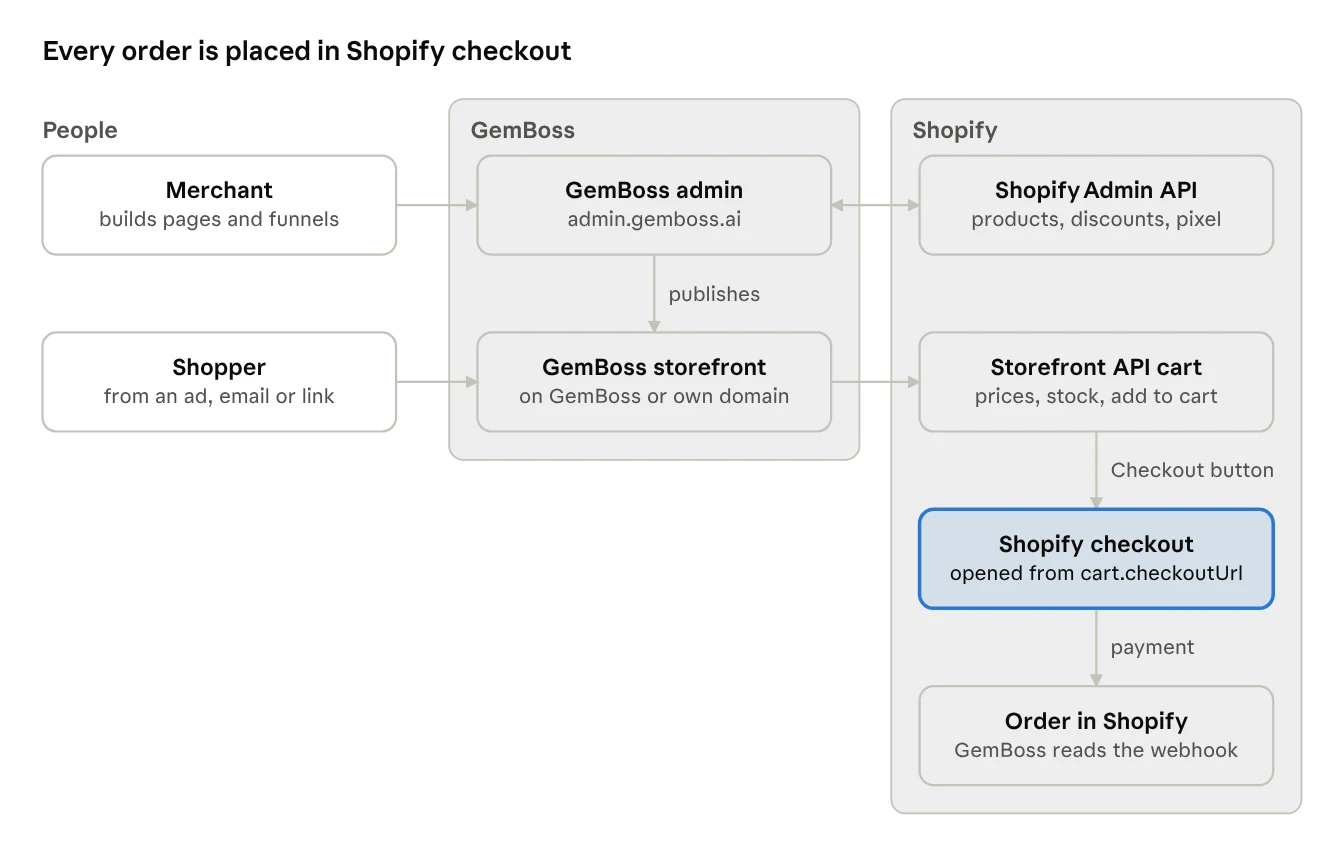
The shopper's path, step by step:
- A shopper opens a GemBoss page from an ad, an email or a link. GemBoss serves it on the store's GemBoss subdomain or on a domain the merchant connects.
- The page shows products, prices, options and stock read from the Storefront API.
- Add to cart creates or updates a Shopify cart through the Storefront API.
- The Checkout button is a plain link to that cart's
checkoutUrl. The shopper opens Shopify checkout in the same tab, with Shop Pay and every payment method the merchant has set up. - Shopify takes the payment and creates the order. GemBoss receives it through the orders webhooks and credits the sale to the page, funnel or test that brought the shopper.
Offers such as quantity breaks and bundles are Shopify discounts created in the store. Shopify applies them in checkout, so the price on the page is the price Shopify charges.
See it on our demo store
The video follows one shopper on our demo store, gemboss-review.store.gemboss.ai, a Shopify development store with sample products. It runs 29 seconds and has English subtitles.
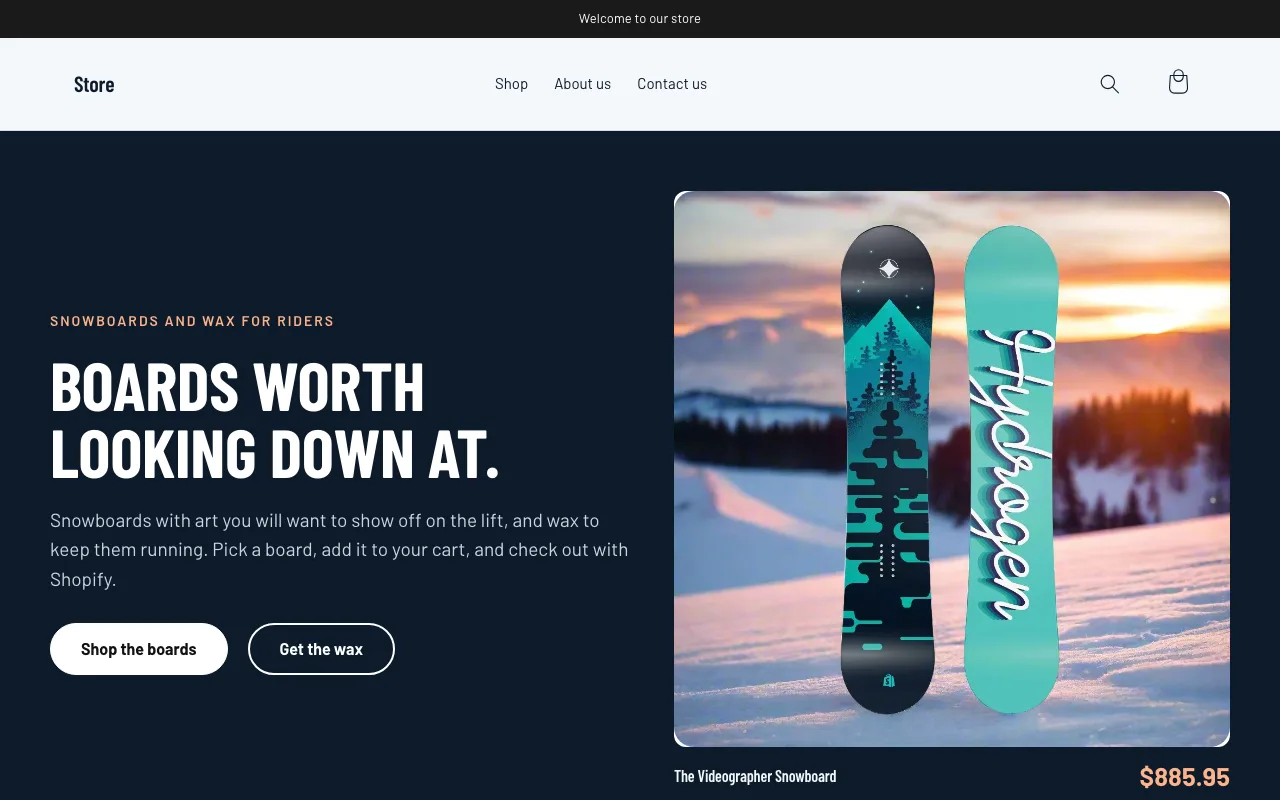
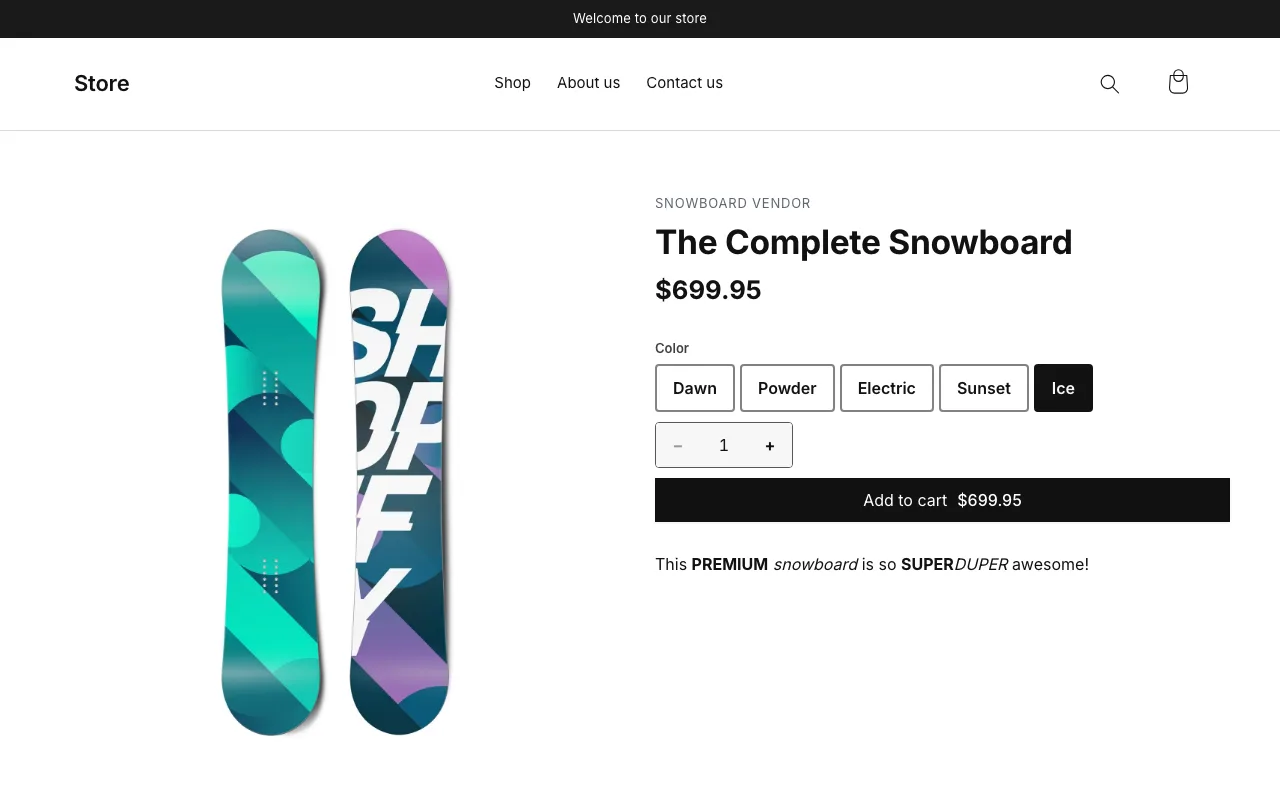
The same path in four screens:
-
The storefront home page, built and hosted by GemBoss.
-
A product page. Title, price, variants and stock come from the Storefront API.
-
The cart. It is a Shopify cart, and its Checkout button links to the cart's
checkoutUrl.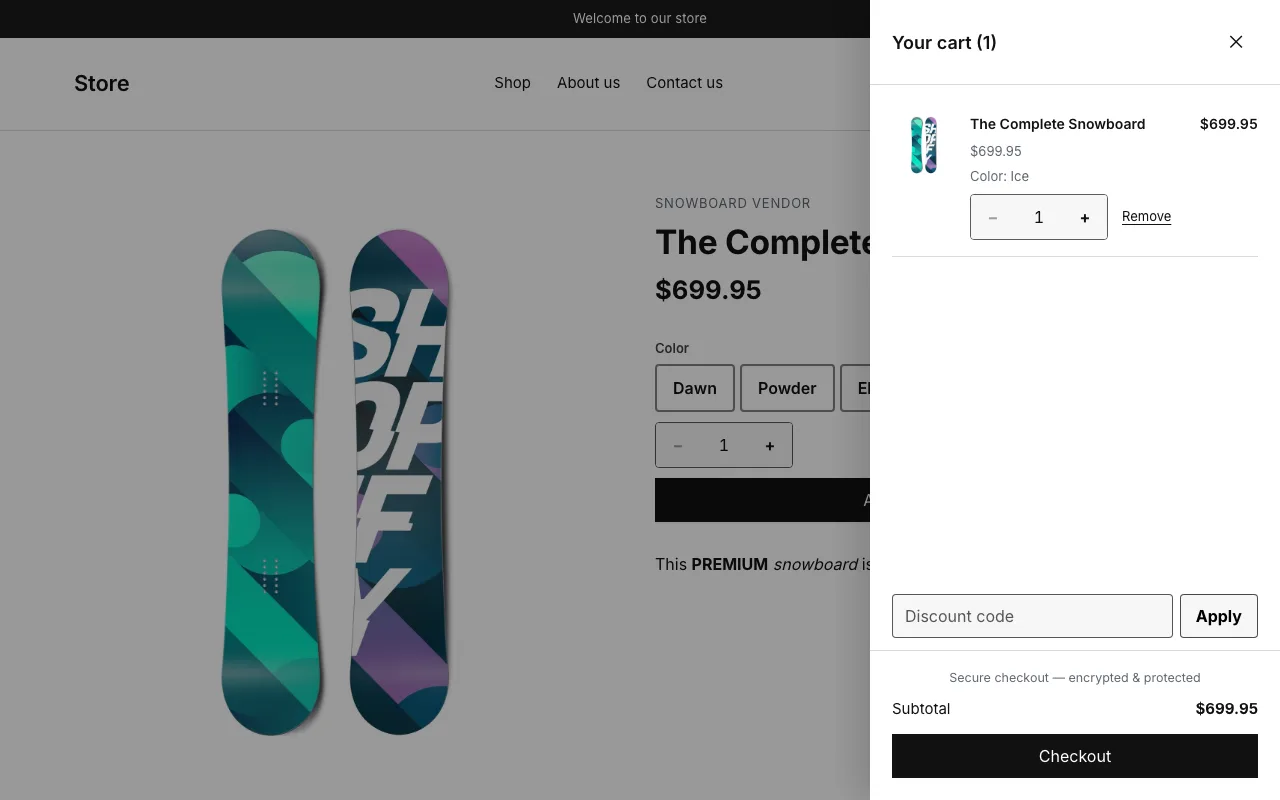
-
Shopify takes over on the store's own Shopify domain, in the same tab. A development store asks for its storefront password first; a live store goes straight to checkout.
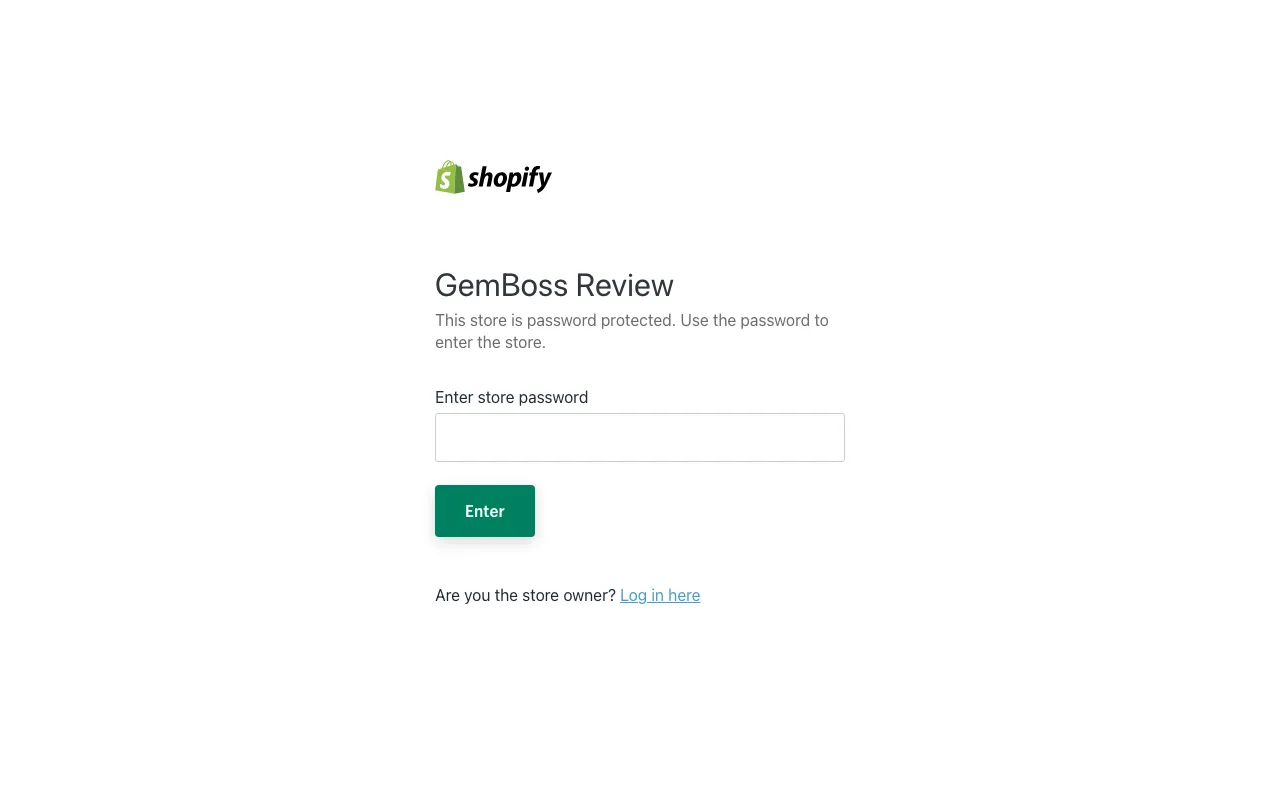
Measured on 20 November 2026: the Checkout link pointed at the store's Shopify domain and had no target attribute, the click stayed in the same tab, and no new tab or window opened.
What GemBoss does for a merchant
A merchant uses GemBoss in one of two ways and can switch at any time: funnel pages beside the Online Store theme, which keeps serving the main domain, or the whole storefront on GemBoss.
| Feature | What the merchant gets |
|---|---|
| Storefront | A headless storefront (home, collection and product pages, cart) built and hosted by GemBoss for that one store |
| Funnels | Landing pages, advertorials, listicles and product pages, linked into funnels for ads and email traffic |
| GemChat assistant | Drafts pages, copy and offers from the store's real products, prices and photos. Runs on GemBoss AI credits included in each plan, or on the merchant's own Claude or Codex subscription |
| Editing | A visual canvas plus chat, with desktop and mobile previews. Pages stay drafts until the merchant publishes them, and a published change can be undone |
| Offers | Quantity breaks and bundles, applied as Shopify discounts |
| Tests and analytics | A/B tests between page versions, heatmaps and funnel analytics, counted against real Shopify orders |
| Personalization | Page variants by traffic source, device, returning visitor and country (Growth plan and up) |
| Product editing | Titles, descriptions, images, prices and stock edited in GemBoss and written to Shopify, which stays the record |
| Sign-up forms | Forms on GemBoss pages that collect an email, phone number or first name. New sign-ups are added to the store's Shopify customers |
Storefront and domains
- Funnel pages beside the Online Store. The Shopify theme keeps serving the main domain. GemBoss pages run on the GemBoss subdomain or on a subdomain of the merchant's domain, such as
go.your-store.com. - The whole storefront on GemBoss. GemBoss serves the home, collection and product pages and the cart on the merchant's domain. The Online Store channel stays installed and the theme stays unchanged, so switching back means pointing the domain at Shopify again.
The storefront design is made and edited inside GemBoss for that one store. It is not a Shopify theme: it is not installed into the Online Store, and it is not sold or distributed as a theme.
Two ways to start from an existing design:
- GemBoss can rebuild the merchant's own store pages from their live addresses, so the merchant starts from what they already have.
- The merchant can show GemBoss a public page they like. GemBoss uses its layout as a reference and fills it with the merchant's own words, photos and products.
Install, sign-in and the GemBoss admin
A merchant installs GemBoss from Shopify and approves its access scopes on Shopify's own screen. GemBoss then opens at admin.gemboss.ai in its own browser tab, already connected to the store.
- Not embedded. The app is a full web app with a canvas editor, chat and analytics, so it runs in its own tab.
- No separate account. A merchant who installs from Shopify is signed in through Shopify, with no password or sign-up form. The owner can invite team members.
- Installs start on Shopify. Before GemBoss is listed, every Connect button inside GemBoss will open the App Store listing, so no merchant types a store domain.
- Plans are chosen on Shopify. Upgrading or downgrading opens Shopify's own plan page for the app.
- Uninstalling removes GemBoss's access token at once.
What GemBoss reads and writes in Shopify
GemBoss requests 20 access scopes, each tied to a feature, and writes nothing to the Online Store theme. Connecting adds only the GemBoss web pixel; nothing else changes until the merchant publishes a page or a funnel.
| Access scope | Why GemBoss needs it |
|---|---|
read_products |
Build pages with the store's real catalog |
write_products, write_inventory, read_locations, write_publications |
Let the merchant edit a product, its stock and its sales channels from GemBoss |
read_themes |
Read the current design and the apps it uses, to bring them into GemBoss. Read only |
write_files |
Upload the images used by GemBoss pages to Shopify Files |
write_discounts |
Create the discounts that offers and bundles need |
write_customers |
Add shoppers who sign up on a GemBoss page to the store's customers |
read_orders |
Count which pages, funnels and tests actually sell |
read_customer_events, write_pixels |
Run the GemBoss web pixel |
read_reports |
Compare GemBoss numbers with Shopify's own analytics |
unauthenticated_read_product_listings, unauthenticated_read_product_inventory, unauthenticated_read_selling_plans, unauthenticated_read_shop_pay_installments_pricing, unauthenticated_read_content |
Show products, stock, subscription options, Shop Pay Installments terms and store policies on the storefront |
unauthenticated_read_checkouts, unauthenticated_write_checkouts |
Run the Storefront API cart and hand the shopper to Shopify checkout |
Subscription scopes are requested only when a store turns subscriptions on, and only for that store.
| App extension | Type | What it does |
|---|---|---|
| GemBoss web pixel | Web pixel | Measures storefront visits and checkout steps |
| Offer discount | Discount function | Applies quantity-break and bundle prices in Shopify checkout |
| Order bump | Checkout UI extension | An add-on offer the merchant places in Shopify's checkout editor |
| Post-purchase offer | Post-purchase extension | A one-click offer after payment, on orders Shopify makes eligible |
Billing
Every charge goes through Shopify App Pricing. GemBoss bills nothing outside Shopify for merchants who install from the App Store.
| Plan | Price | Trial |
|---|---|---|
| Starter | $39 a month | 14 days |
| Growth | $79 a month | 14 days |
| Scale | $199 a month | 14 days |
| Custom (managed service) | from $399 a month, a private plan per contract | by agreement |
Extra AI credits and extra funnel sessions are Shopify usage charges. They are off by default, and the store owner sets a monthly cap. A store without a plan can build and preview pages but cannot put a funnel live. Details: Pricing.
Data and privacy
| Data | What GemBoss keeps | Why |
|---|---|---|
| Store access | The Shopify access token, encrypted | Call the Admin API and Storefront API for that store |
| Merchant work | Pages, sections, funnels, tests, assistant conversations | The product itself |
| Shopper activity | Visits and events on GemBoss pages and from the web pixel | Analytics, heatmaps and A/B test results |
| Shopper sign-ups | Email, phone number and first name typed into a GemBoss sign-up form | Added to the store's Shopify customers |
customers/data_requestandcustomers/redactare answered for shopper data.shop/redacterases the store's data in GemBoss, including its access token, account, pages, sections and assistant conversations.app/uninstalledremoves the access token at once.- Policies: Privacy and Terms.
What GemBoss does not do
- It has no checkout and processes no payments. Every order is placed in Shopify checkout.
- It does not write to the Online Store theme, and it does not let merchants download, install or sell themes.
- It does not bill App Store merchants outside Shopify.
- It is not a marketplace: each storefront sells one merchant's own products.
- It does not ask the merchant to turn off the Online Store channel or replace their theme.
How GemBoss meets the Shopify App Store requirements
Read against the App Store requirements and the API Terms on 20 November 2026.
| Rule | How GemBoss handles it | Status |
|---|---|---|
| 1.1.2 Use Shopify checkout | Every order goes through Shopify checkout, opened from the cart's checkoutUrl |
Met |
| 1.1.3 Themes only from the Theme Store | GemBoss designs are not themes; nothing is downloaded, installed or sold as a theme | Met |
| 5.1.1 Theme app extensions | GemBoss does not modify the theme | Does not apply |
| 1.1.5 Not identical to our other apps | GemPages builds pages inside the theme. GemBoss hosts the whole storefront and its funnels, with an AI assistant, tests and analytics | Met |
| 1.2.1 Shopify billing | Shopify App Pricing for plans and usage charges | Met |
| 1.2.3 Change plan without support | Shopify's own plan page | Met |
| 2.3.1 Install starts on Shopify | Every Connect button inside GemBoss opens the App Store listing | Done before listing |
| 4.3.1 Online Store or custom storefront | This page explains both ways to use GemBoss; the Online Store stays on | Met |
| Privacy webhooks | customers/data_request, customers/redact, shop/redact answered |
Met |
Other Shopify apps built the same way
These apps on the Shopify App Store also host storefronts or funnel pages outside the Online Store theme and keep Shopify checkout. Listings read on 20 November 2026.
| App | Category | What the listing says |
|---|---|---|
| ConvertFlow (ConvertFlow, Dec 2020) | Page builder | "Host headless funnels on custom domain" |
| Smootify (Eclipse SRL, Jul 2024) | Page builder | "Publish the store with a custom domain"; "Checkout and orders stay native." |
| Storesynk (Fünf, Dec 2024) | Storefronts - Other | "the flexibility of a headless setup"; "Add your Webflow custom domain" |
| Comet: Campaign Funnel Builder (Comet Rocks GmbH, Feb 2025) | Page builder | "Each store gets its own URL and tracking." |
| Weaverse Hydrogen Page Builder (Weaverse, Jan 2023) | Storefronts - Other, Page builder | "a visual page builder for Shopify Hydrogen" |
| Headless (Shopify, Jan 2023) | Storefronts - Other | "Create any shopping experience you want with the Storefront API and Customer Account API" |
| GemPages (GEMCOMMERCE CO., LTD, Mar 2017) | Page builder | The Optimize plan lists "Headless page" |
Common questions
Does GemBoss replace Shopify checkout?
No. Every cart on a GemBoss page is a Shopify cart, and every order is placed in the store's Shopify checkout.
Does GemBoss change my Shopify theme?
No. GemBoss can read the theme to bring the design and its apps in, and it never writes to the theme.
Can I use GemBoss for a few pages and keep my theme?
Yes. Run GemBoss funnel pages on a subdomain and keep the theme on the main domain. You can move the whole storefront to GemBoss later, or never.
Contact
GEMCOMMERCE CO., LTD, Shopify Partner ID 409386. Questions about GemBoss, including from Shopify's review team: support@gemboss.ai. This page describes GemBoss as of 20 November 2026.
Stuck on the connection?
You connect at https://mcp.gemboss.ai/mcp and sign in through your browser; there is no key to ask for. If the browser step does not finish, the troubleshooting page walks through what to check.
Thanks. That goes straight to the people who write these.